Published
November 5, 2026
Product update 5/11: Invoicing in Spotable

From 5 November, if you’re a customer in Belgium, you can create and send your invoices in Spotable, as we announced in our update of 14 October. Your invoice starts from your approved quote and follows the installment plan you set yourself. Here’s how it works, and what to set up first.

From approved quote to invoice
Your quote already knows everything: your client, the site address, the work items, the VAT and the totals. Your invoice takes it all over.
- Open an approved quote.
- At the bottom, click Start invoicing.
- Choose your Default company installment plan, or No installment plan for one invoice with no advance.
- Spotable prepares an invoice for each installment, as a draft. You’ll find them in your project under Invoices, grouped by quote.
A draft has no number yet. The invoice gets its number, invoice date and due date when you send it.
Something came up along the way? Before you send the final invoice, click Add extra work on it. That way unexpected costs and extras are billed too.

All your invoices in one place
In your project, under Invoices, you see all your invoices grouped by quote, with their status: Draft, Issued, Sent, Paid or Cancelled. Through the three dots next to an invoice you can still edit it, download it or send it.
When you send an invoice, your client gets an email with the invoice attached as a PDF. You can still edit that email, and send yourself a test email first.
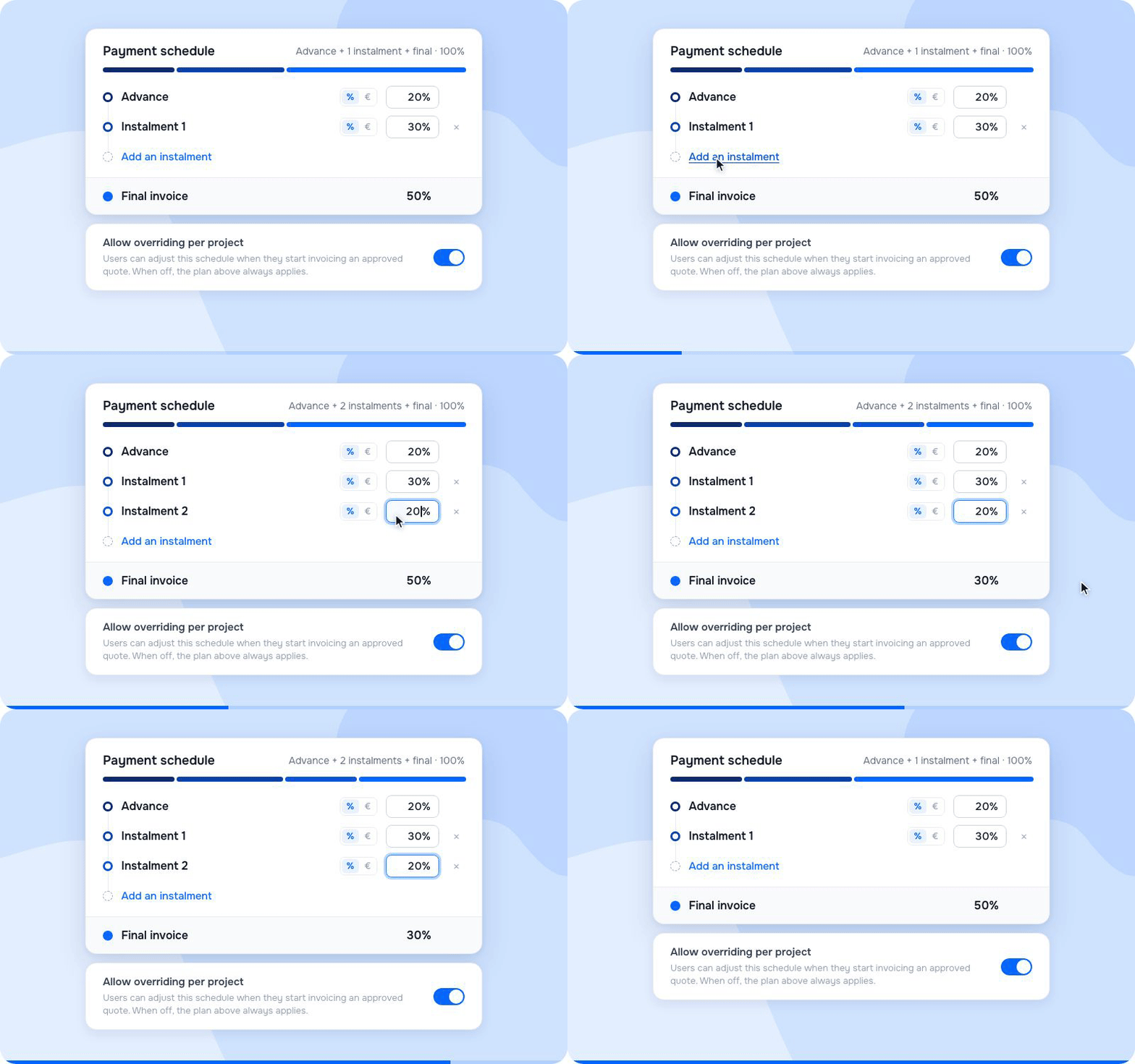
Your installment plan decides when you invoice
An installment plan spreads the amount of your quote over several invoices. For example a 20% advance at the start, 30% halfway and the rest on the final invoice. For each installment you choose a percentage or a fixed amount. The final invoice is always whatever is left.
You set your default plan once, under Settings → Invoicing → Payment Schedule. For each quote you then pick that plan, or one invoice with no advance. When you start invoicing an approved quote, you can still adjust that plan. Don’t want that? Switch the option off on the same screen, and your default plan always applies.
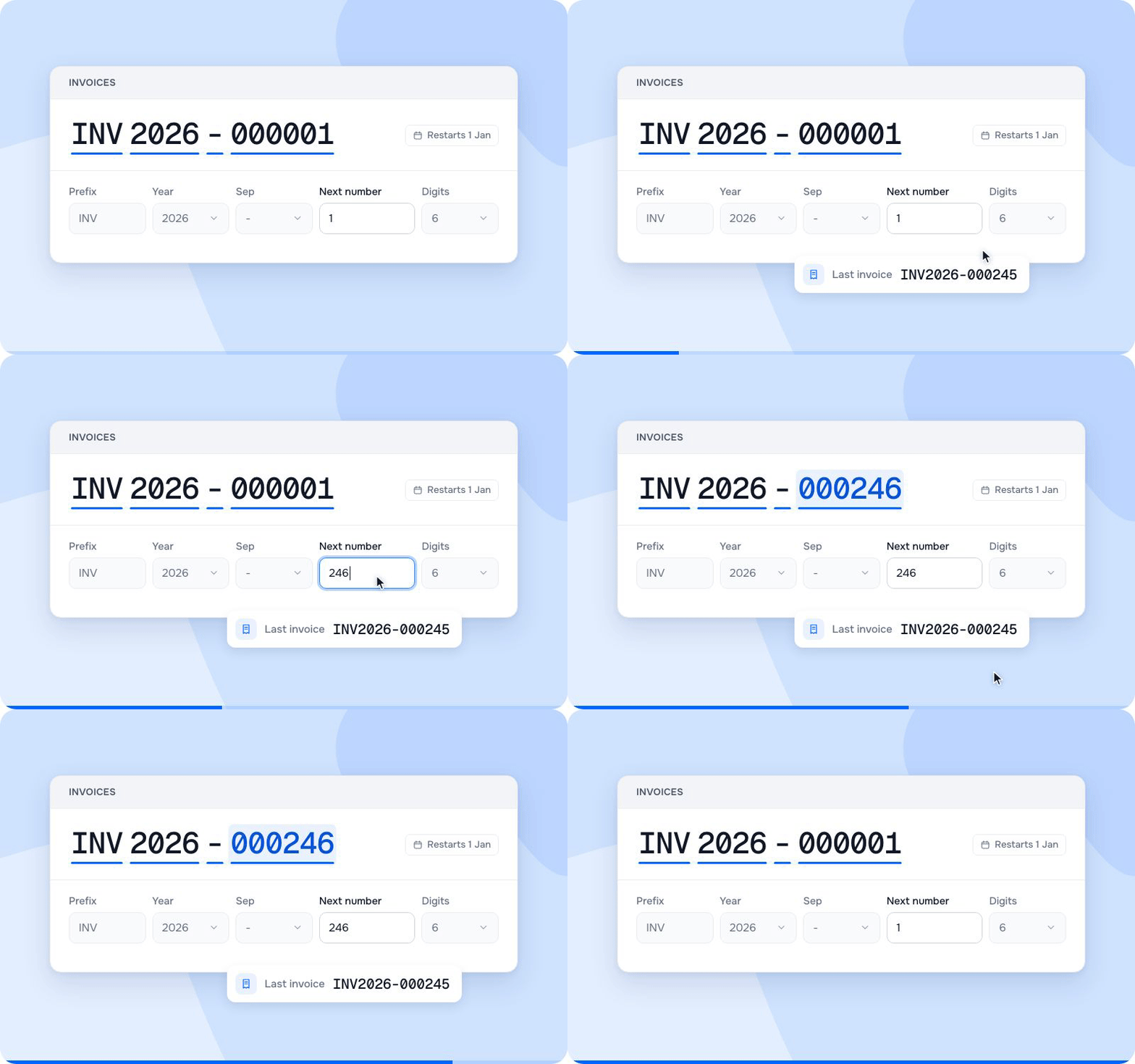
Set up your numbering before your first invoice
Invoices have to be numbered in one unbroken sequence, with no gaps. That’s a legal requirement. So under Next number, enter the number that follows your last invoice in your current program. If your last invoice was INV-000245, you enter 246.
Invoices and credit notes each have their own series. For each series you choose the prefix, whether the year is in it, the separator, the next number and how many digits the number has. At the top you see right away what your number looks like. With the year in the number, the counter restarts on 1 January. You’ll find it under Settings → Invoicing → Numbering.
Your payment details and a standard note
Your IBAN and payment term are printed on every invoice. Spotable works out the due date itself: the invoice date plus your payment term, 30 days by default.
Want the same text on every invoice, such as your payment conditions? Add it under Notes & comments and it’s there every time.
Invoices to businesses through Peppol
Since 1 January 2026, Belgian businesses have to send invoices to other businesses electronically, through Peppol. Spotable handles that for you, after a one-time Peppol verification under Settings → Invoicing → E-invoicing. It’s usually done quickly, though it can take a few minutes. After that, Peppol works straight away in Spotable.
Frequently asked questions
Who can use invoicing?
All Spotable customers in Belgium, from 5 November. Invoicing isn’t available in other countries yet.
Do I always have to use an installment plan?
No. For each quote you choose yourself: your installment plan, or a single invoice with no advance.
Which number do I enter under Next number?
The number that follows your last invoice in your current program. If that was invoice 245, you enter 246. Check it before you send your first invoice from Spotable.
Can I start a new numbering instead of continuing?
Yes. Start a new series with a different prefix. That way your old and new invoices each keep their own unbroken series.
Can I still change an invoice after sending it?
No. Once sent, your invoice is locked, as the law requires. Creating credit notes in Spotable is coming soon. Need to correct something now? Send us a message via the chat and we’ll help you.
Is my invoice sent automatically?
No. You check each invoice and send it yourself. Your client gets it by email, with the PDF attached.
Can I still bill unexpected costs?
Yes. On the final invoice, before you send it, you click Add extra work. That way unexpected costs and extras are billed too.
Does invoicing cost extra?
No. Invoicing is currently included in your Spotable plan at no extra cost.


Other
Product updates
The latest industry news, interviews, technologies, and resources.